
There is a specific kind of excitement that hits you when you solve a problem you did not fully understand you were solving. This is that story.
The Setup
I was working as a MuleSoft developer on a project where my piece of the work sounded simple enough on paper. Another team was building a financial portal, basically a web app where clients could log in and see their fund-related data pulled straight from Salesforce. My job was to build the API in the middle: the layer that sits between the portal and the Salesforce CRM, fetches the right data, and sends it back.
Simple enough, right? The portal handles the login, I build the API, Salesforce has the data, and everyone is happy.
Except the API did not just need to fetch data from Salesforce. It needed to fetch data for that specific user — and only that user. It had to behave differently depending on who was logged into the portal at that moment. Later, it also needed to create and update records on their behalf. That changes everything.
The First Attempt: The Obvious Solution
When you are looking at this problem for the first time, your mind goes to the most logical place: just filter the data. The portal sends the logged-in user's username along with the API request, and you use it to query Salesforce with a simple WHERE clause. Give me records where the owner matches this username.
And honestly? It worked. Data came back. The portal showed the right fund information. The tests passed.
But something felt off. What was actually stopping anyone from passing a different username in that request? The API had no way of checking whether the person calling it was really the person they claimed to be. The portal might be secure, but my API was essentially trusting a field in an HTTP request — a field that anyone could change. For a general internal tool, that is a bit uncomfortable. For a financial portal showing clients their investment data, that is a real security risk.
The bigger issue showed up when the requirements evolved. It was not just about reading data anymore. The portal also needed users to create and update records in Salesforce. And this is where the filter approach completely fell apart.
When MuleSoft creates a record in Salesforce, it does so as the integration user — the single Salesforce account MuleSoft uses to connect. So now a client performs an action through the portal, a record gets created in Salesforce, and that record is stamped as belonging to a system account instead of the actual user. The audit trail is wrong. The record ownership is wrong. For a financial product where compliance matters, that is not a small issue.
The filter approach was a workaround pretending to be a proper solution.
The Real Problem and Why It Is Easy to Miss
What I was actually dealing with was a challenge called user context propagation. It basically means carrying a real human user’s identity across system boundaries. Most MuleSoft and Salesforce integrations do not need this. They run as a single service account, process batch jobs, sync records in the background, and no specific person is involved. For that kind of work, a dedicated integration user is perfectly fine.
But a user-facing portal is completely different. The moment a real person logs in and expects to see their data, interact with their records, and have their actions tracked properly, you need to carry their identity all the way into Salesforce. The API is no longer just a data pipe — it becomes something that has to answer a harder question: who is asking, and can I prove it?
I did not frame it that way at first. But once I dug deeper, that was the real problem sitting underneath everything.
The Discovery: JWT Bearer Token Flow
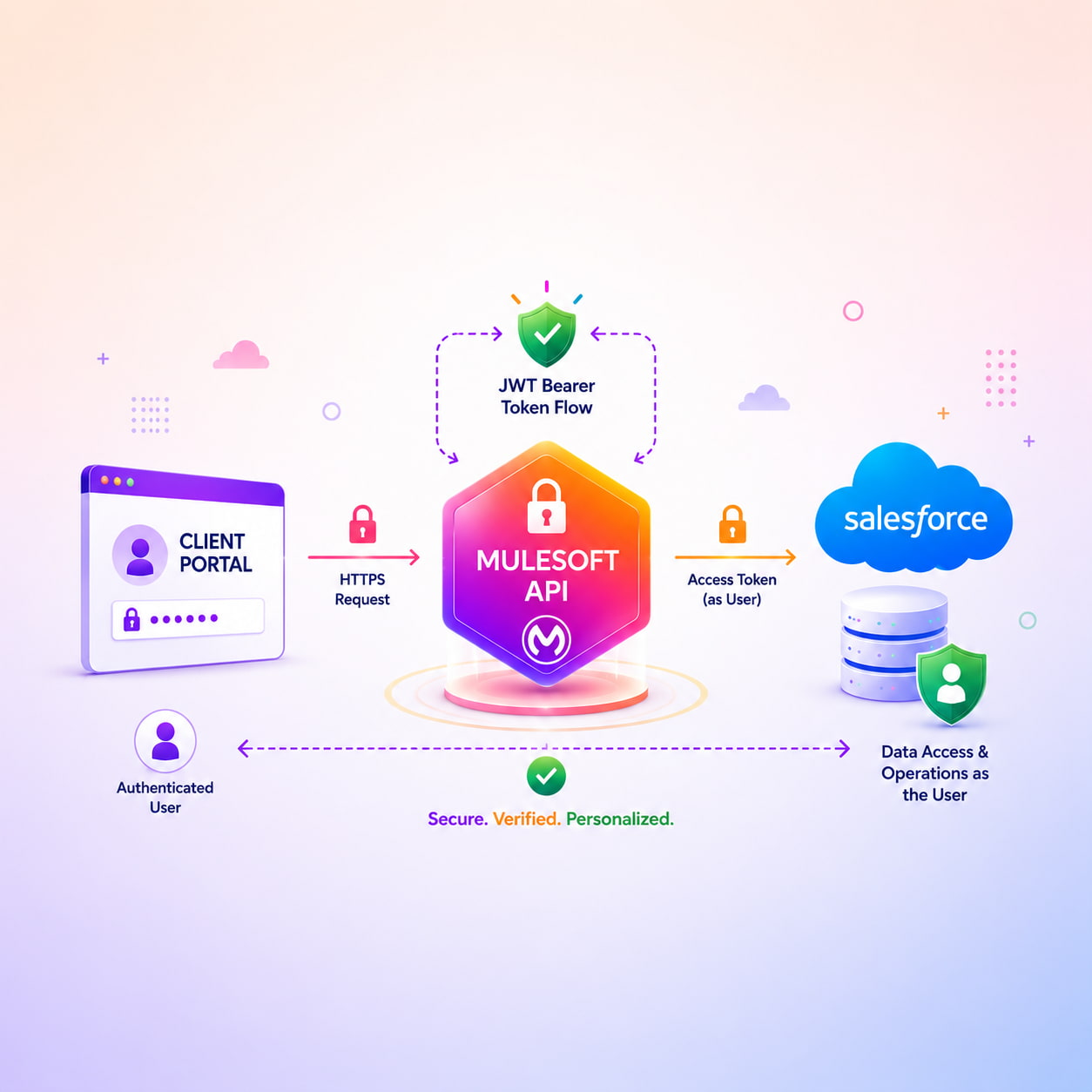
I came across the OAuth 2.0 JWT Bearer Token flow while going through Salesforce Connected App documentation more carefully. The first time I read how it worked, it genuinely surprised me. The idea that MuleSoft could act as another Salesforce user—not by knowing their password, but by presenting a signed JWT that Salesforce trusts—felt almost too clever. But that is exactly what it does, and it is a well-designed security pattern.
Here is how it works in simple terms. You set up a Connected App in Salesforce with a digital certificate. MuleSoft holds the private key that matches that certificate. When the portal makes a request for a specific user, MuleSoft generates a JWT, which is a signed token that asserts, “I want to act as this Salesforce user.” It sends this to Salesforce’s token endpoint. Salesforce verifies the signature using the trusted certificate, confirms the user exists and is authorized, and then issues an access token that belongs to that specific user.
From that point on, every call MuleSoft makes to Salesforce is made as that user. If they query data, Salesforce applies the sharing rules for their account. If they create a record, it is created by them. If they update something, the audit log shows their name, not a system account. The integration user is completely out of the picture.
That was the moment I stopped and actually thought about it. The audit trail problem was gone. The “what if someone passes a fake username” problem was gone, because MuleSoft was no longer trusting a username field blindly. It was going through a proper cryptographic flow with Salesforce to prove the user’s identity. The portal sends a user identifier, MuleSoft handles the JWT exchange, and Salesforce decides whether to grant access. That is a completely different—and correct—security model.
The Authorization Layer: Permission Sets
Getting authentication right was only half of the picture. The other half was authorization, which means not just proving who someone is, but controlling what they are allowed to see and do.
This is where Salesforce Permission Sets came in. Rather than having MuleSoft make decisions about what data to expose, I used Salesforce’s own access control system. Users who were meant to access the portal data were assigned a specific Permission Set in Salesforce—configured with exactly the object access, field visibility, and record-level permissions they needed, and nothing more.
This separation mattered a lot. MuleSoft’s job was identity: ensuring the right person was making the request. Salesforce’s job was access control: deciding what that person could see or change. Neither system was doing the other’s job. If access rules ever needed to change, you would update the Permission Set in Salesforce without touching the MuleSoft code at all. Clean, auditable, and fully aligned with Salesforce’s own governance model.
What I Actually Took Away From This
Looking back, the filter-by-owner approach was not a silly idea. It was the most natural first step for someone who had not run into this specific problem before. Most MuleSoft projects do not need per-user identity propagation, so there is no real reason you would already know this pattern the first time you hit it.
But that is exactly why I wanted to write this down.
The JWT Bearer Token flow gives you the right guarantees. It takes more setup: the Connected App, the certificate, and caching tokens per user so you are not re-authenticating on every request. But once it is in place, it holds up properly. Salesforce knows exactly who it is talking to. Data is scoped to the right user. And when a record is created, the audit log shows the actual human who created it, not a faceless system account.
For a financial product, that is not just a technical win. It is the difference between an integration that works and one you can actually stand behind.
If you are working on something similar or have hit a wall with per-user context in a MuleSoft-Salesforce integration, feel free to reach out to us.